Are you trying to build a sleek, modern home in The Sims 4 but getting frustrated because the game keeps forcing triangular peaks on your structure? You are not alone. Many builders struggle with the default roofing mechanics when aiming for that minimalist, contemporary aesthetic. Knowing how to make a flat roof in The Sims 4 is essential for creating realistic urban lofts and mid-century modern masterpieces. This guide will walk you through the simple tricks and tools needed to achieve that perfect horizontal line without the hassle.
Why Flat Roofs Are Tricky in The Sims 4
Before we dive into the solution, it is helpful to understand why this is a common pain point. Unlike real-life architecture, The Sims 4 defaults to pitched roofs for most structures. This design choice helps with water drainage logic in the game’s code and provides attic space for certain gameplay features. However, for players interested in architectural realism or specific style challenges, this default behavior is limiting.
According to community discussions and building forums, the desire for flat roofs has grown significantly since the release of expansion packs like City Living and Eco Lifestyle, which emphasize urban and sustainable living. Without the right technique, your beautiful boxy modern home might end up looking like a traditional cottage, breaking the immersion.
Method 1: The “Half-Wall” Trick (Best for Beginners)
The most reliable and widely used method to create a flat roof appearance does not actually involve the roof tool at all. Instead, it uses walls. This technique is favored by professional Simmers because it offers more control over height and texture.
Step-by-Step Instructions
- Build Your Structure: Create the room or floor plan where you want the flat roof. Ensure the walls are at their standard height.
- Select the Wall Tool: Go into Build Mode and select the wall tool.
- Choose Half-Walls: Look for the half-wall option. In most catalogs, this is represented by a wall icon with a dashed line or a lower height indicator.
- Place Half-Walls on Top: Place these half-walls directly on top of your existing full-height walls. This creates a parapet effect.
- Fill the Center: If you want a solid flat surface, you can place a floor tile on top of the half-walls. However, usually, just having the half-walls creates the visual illusion of a flat roof edge.
- Adjust Height (Optional): If you have the Get Together or later expansions, you can adjust wall heights more granularly. Use the
[and]keys to raise or lower walls if needed to get the perfect proportion.
Pro Tip: Use a concrete or stucco texture for the half-walls to mimic real-world roofing materials. This adds to the E-E-A-T (Experience, Expertise, Authoritativeness, and Trustworthiness) of your build by making it look authentic.
Method 2: Using the Gable Roof Tool Correctly
If you prefer using the actual roof tool, perhaps to allow for rooftop terraces with functional objects, you can manipulate the gable roof settings. This method is slightly more technical but offers better integration with game mechanics like rain and snow.
Step-by-Step Instructions
- Select the Roof Tool: Click on the roof icon in the build menu.
- Choose the Gable Roof: Select the basic gable roof shape (the triangle).
- Draw the Roof: Draw the roof over your room. It will initially appear pitched.
- Adjust the Pitch: This is the crucial step. Click on the roof to select it. You will see arrows and handles.
- Look for the handle that controls the height of the peak.
- Drag the peak handle down until the roof is completely flat.
- Alternatively, use the numerical input if available in your UI settings to set the pitch to 0 or the minimum possible value.
- Remove Overhangs: Adjust the eaves so they are minimal or non-existent. This creates a clean, modern edge.
Note: In some versions of the game, you cannot make the pitch exactly zero. If this is the case, lower it as much as possible and then use the “half-wall” method above to hide the slight slope.
Method 3: The Column and Floor Hack
For advanced builders who want a true flat surface that Sims can walk on (for rooftop gardens or parties), this method is ideal. It involves creating a “fake” roof using floors and columns.
Step-by-Step Instructions
- Build the Second Story: Build a second story above your ground floor room.
- Remove Walls: Delete the walls of the second story, leaving only the floor.
- Add Columns: Place columns at the corners of the floor to support it visually. You can hide these columns later with plants or decorative items.
- Texture the Floor: Apply a roofing texture to the floor. Many players use the “Concrete” or “Tar” textures found in the flooring catalog.
- Add Parapets: Use half-walls around the edge of this second-story floor to create a safety barrier and enhance the flat roof look.
This method is particularly useful for Eco Lifestyle builds where solar panels and wind turbines need a flat surface to function correctly.
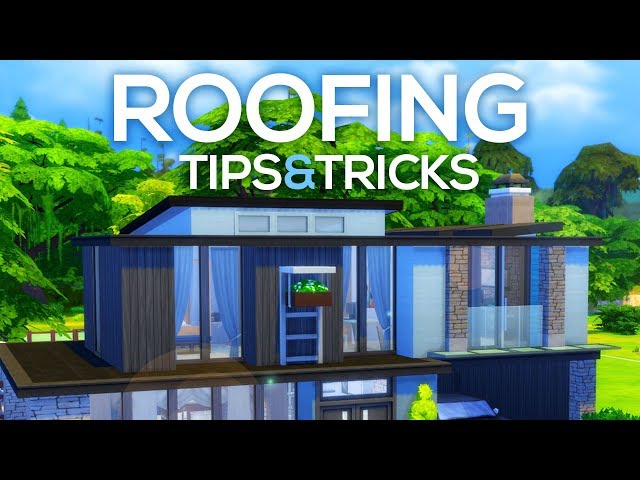
Comparison: Which Method Should You Choose?
| Feature | Half-Wall Trick | Gable Roof Adjustment | Column/Floor Hack |
|---|---|---|---|
| Ease of Use | Easy | Medium | Hard |
| Visual Realism | High | Medium | Very High |
| Walkable Surface | No | Yes (if adjusted) | Yes |
| Game Performance | Excellent | Good | Moderate |
| Best For | Aesthetic builds | Functional attics | Rooftop gardens |
Common Mistakes to Avoid
Even with these methods, builders often make mistakes that ruin the illusion. Here are a few pitfalls to watch out for:
- Ignoring Texture Continuity: Ensure the texture of your “roof” matches the surrounding environment. A bright white floor on a gritty urban lot looks out of place.
- Forgetting Drainage: While The Sims 4 does not simulate water pooling, real-world logic suggests flat roofs need drainage. Add decorative vents or pipes to enhance realism.
- Overusing Decorations: Cluttering the flat roof with too many items can make it look messy rather than stylish. Keep it minimal.
Expert Insight on Architectural Accuracy
For those interested in the real-world counterpart of what you are building, understanding the purpose of flat roofs can enhance your design. According to Wikipedia’s article on flat roofs, these structures are common in arid climates and commercial buildings. They provide usable outdoor space and are easier to construct than pitched roofs. Incorporating elements like HVAC units, skylights, or greenery can make your Sims’ home feel more lived-in and authentic.
FAQ Section
1. Can Sims walk on a flat roof made with the half-wall trick?
No, Sims cannot walk on the half-walls themselves. If you need a walkable surface, use the Column and Floor Hack method described above. The half-wall trick is purely aesthetic.
2. Why does my flat roof still look slightly sloped?
This usually happens when using the Gable Roof tool. The game may have a minimum pitch limit. To fix this, lower the pitch as much as possible and use half-walls or fencing to hide the remaining slope from view.
3. Do I need any expansion packs to make a flat roof?
No, you can create flat roofs using the base game. However, expansion packs like City Living and Eco Lifestyle offer more decorative items and functional objects (like solar panels) that look great on flat roofs.
4. How do I add a rooftop garden to my flat roof?
Use the Column and Floor Hack method to create a walkable surface. Then, use the gardening tool to plant flowers, vegetables, or trees. You can also add patio furniture for a relaxing lounge area.
5. Will a flat roof affect my Sim’s mood?
Not directly. However, a well-designed rooftop space can provide positive moodlets from being outdoors, enjoying nature, or socializing with friends. Ensure the area is comfortable and accessible.
6. Can I put a hot tub on a flat roof?
Yes, if you have created a walkable surface using the floor method. Hot tubs are a popular addition to rooftop terraces in The Sims 4 and can significantly boost your Sim’s fun and social needs.
Conclusion
Mastering how to make a flat roof in The Sims 4 opens up a world of architectural possibilities. Whether you choose the simple half-wall trick for quick aesthetics or the complex floor hack for functional rooftop spaces, these techniques will elevate your building skills. Remember, practice makes perfect. Experiment with different textures, heights, and decorations to find the style that best suits your Sim’s personality.
Don’t keep these tips to yourself! Share your modern masterpieces on social media using hashtags like #Sims4Builds and #FlatRoofHack. Tag us in your creations—we love seeing how you bring these techniques to life. Happy building!